Process
Process
A process uniquely owns:
- PC
- Stack pointer (stores return addresses)
- Address space
- File descriptors
To manipulate a process, user code must invoke system calls to enter kernel mode. Always check syscall return values; -1 indicates an error.
Kernel Space
- Kernel space is at the top of the entire virtual address space and is shared by all user processes. User processes occupy the lower portion.
- As long as the system is running, the kernel remains active. It doesn’t start/stop like ordinary processes; it initializes at boot and runs until shutdown.
Process termination
A process can terminate via three paths:
- Receiving a signal whose default action is terminate
- Returning from main
- Explicitly calling exit
fork()
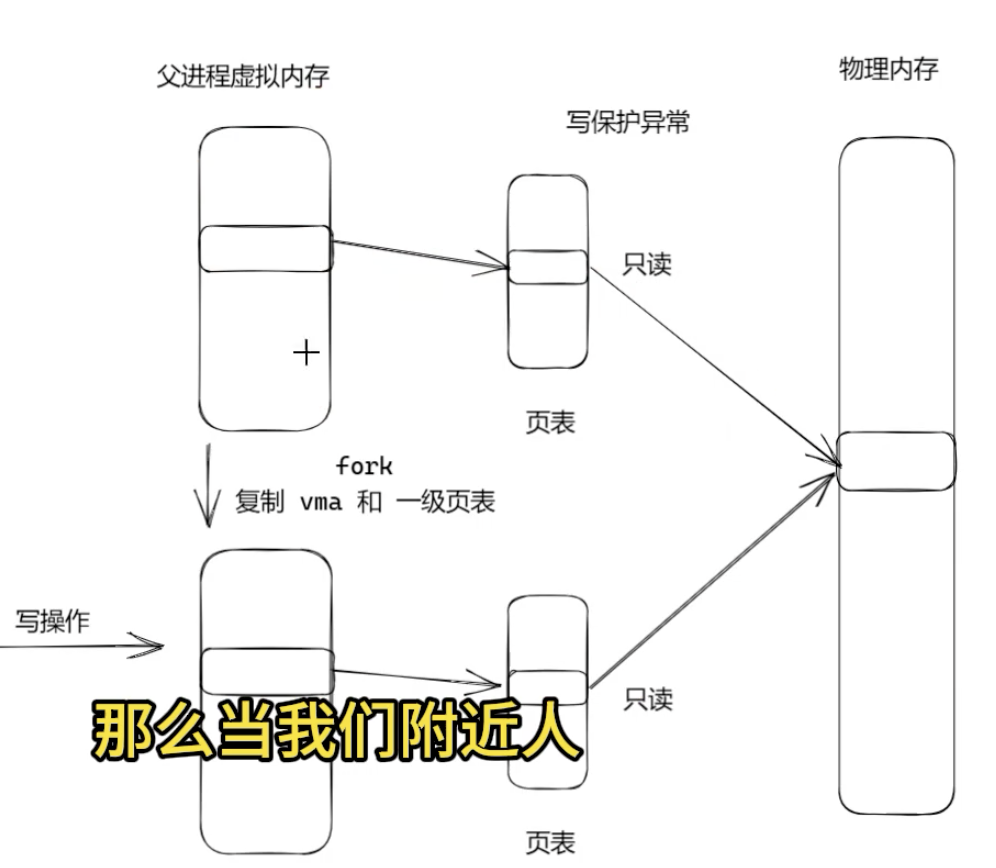 When fork() creates a child, the child inherits everything from the parent (PC, stack pointer, file descriptors). The child has an identical but separate virtual address space, and initially both parent and child virtual pages point to the same physical memory because the parent’s page table is copied to the child.
Copy-on-write: The shared physical pages are marked read-only at fork time. When either process attempts to modify a page, a page fault (write-protection fault) occurs; the OS allocates a new physical page, copies the contents, and applies the modification to the new page.
Zombie processes
When a child finishes, it stores its return value in a kernel data structure and notifies the OS that it has exited. The parent can retrieve it via wait()/waitpid(). If the child has terminated but the parent never calls wait()/waitpid(), the child still consumes system resources (e.g., exit status storage, a slot in the process table) — it remains a zombie.
Orphan processes
If a parent terminates while its children are still running, the OS re-parents those children to init (pid=1). init will reap them when they exit.
File descriptors
Each process has a PCB that stores a file descriptor table. File descriptors are indices into this table. The table entries point to resources such as a heap-allocated FILE structure, which in turn points to the actual file on disk.
Inter-process communication (IPC)
Pipes
- Anonymous pipes: allow communication between related processes.
| |
The shell forks child processes for cat and grep, then sets up a pipe (a kernel buffer) so cat’s stdout becomes grep’s stdin.
- Named pipes (FIFOs)
| |
Creates a special file on disk; processes use file descriptors to read/write. Unidirectional by default.
Message queues
Pros: asynchronous communication.
Cons: higher memory usage.
System calls: msgget to create, msgsnd to send, msgrcv to receive.
Shared memory
shmget creates a shared memory segment. Different processes map part of their virtual address spaces to the same physical memory, enabling efficient data exchange.
Pros: fast reads/writes.
Cons: requires synchronization for mutual exclusion.
Semaphores
Used for synchronization/mutual exclusion.
- Synchronization: initialize semaphore to 0 (represents resource count)
- Mutual exclusion: initialize to 1
Signals
Signals can be synchronous or asynchronous. You can define a handler or ignore most signals.
SIGKILL cannot be caught or ignored.
Asynchronous signals
- 2 — SIGINT — keyboard interrupt (asynchronous), triggered by external events unrelated to the current instruction
- 9 — SIGKILL — forceful termination
Synchronous signals
- SIGTRAP (debug breakpoint), intentional traps
- SIGSEGV (segmentation fault), faults due to invalid memory access or illegal opcode — unintentional but recoverable in some contexts